SuperSpin Casino App and Mobile PWA for iPhone and Android
 Available in GB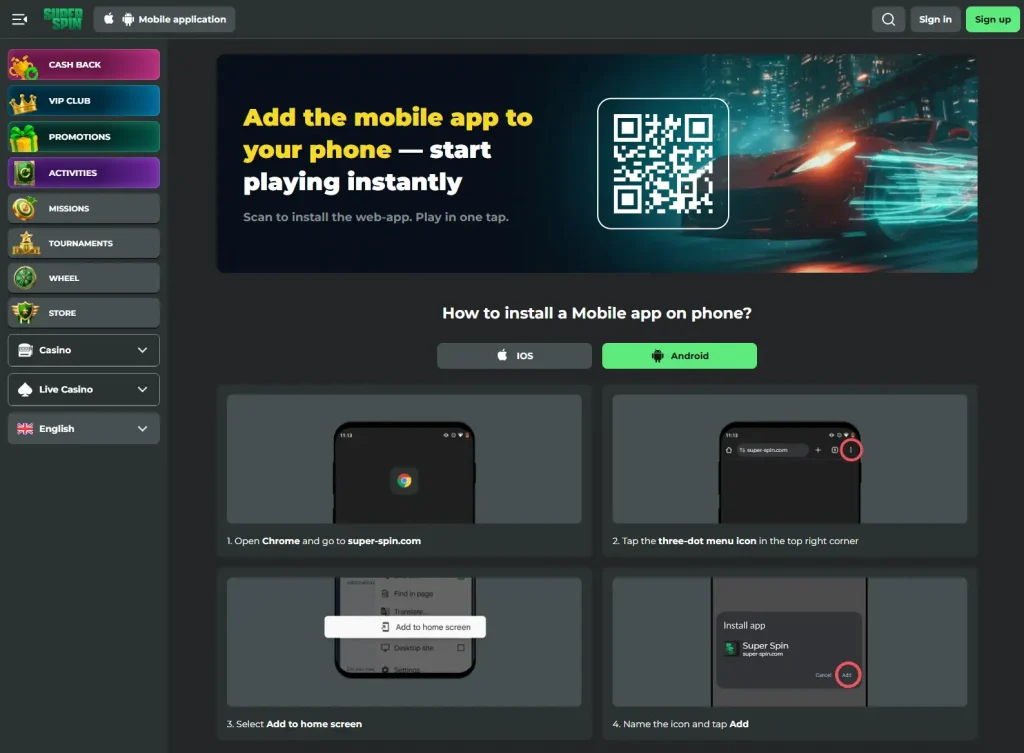
SuperSpin uses a browser-based mobile setup with add-to-home-screen guidance for iOS and Android. In practical terms, that means you do not need a conventional App Store or Google Play casino download to create app-like access from a phone. The important distinction is that a Progressive Web App or home-screen shortcut is not the same thing as a native store app. SuperSpin’s casino lobby currently includes slots and live casino content, so the mobile question is mainly about how you access the site rather than whether a separate native casino application is required. That access model should not be confused with unrelated third-party apps called “Super Spin”.
Table of Contents
- Is there a SuperSpin Casino app?
- PWA versus native app in plain English
- What iPhone users should expect
- What Android users should expect
- Games, live casino and cashier access on mobile
- How to add SuperSpin to a home screen safely
- Mobile access does not settle UK eligibility
- What a home-screen PWA can and cannot do
- When SuperSpin’s PWA makes sense on a UK phone
- SuperSpin Casino Licence: Anjouan Status vs UKGC Requirements
Is there a SuperSpin Casino app?
SuperSpin provides mobile access through a browser/PWA model for iOS and Android. The key point is not the word “app” in isolation, because search results for that phrase can surface unrelated software with the same or a similar name. For the casino, the verified model is browser access with an add-to-home-screen route rather than a claim that a native casino app has been verified in Apple’s App Store or Google Play.
| Access type | What is verified | What is not claimed here |
|---|---|---|
| Mobile browser | SuperSpin can be accessed through the mobile web experience. | No specific speed score or device benchmark is claimed. |
| PWA/home-screen access | The brand provides add-to-home-screen installation guidance for iOS and Android. | This is not described as proof of a native store package. |
| Apple App Store | No native SuperSpin casino listing has been verified. | Unrelated apps with similar names are not attributed to the casino. |
| Google Play | No native SuperSpin casino listing has been verified. | A similarly named game from another developer is not the casino app. |
PWA versus native app in plain English
A native app is installed from a software store as a packaged application. A Progressive Web App starts from a website and can provide a more app-like launch experience, often through a home-screen icon. The underlying access route remains web based rather than depending on a dedicated casino listing in a store.
For users, the distinction matters because it changes what they should look for. If SuperSpin’s instructions direct you to open the site and add it to the home screen, searching an app store for a matching name is unnecessary and can be confusing. A third-party product can share the same name without having any connection to the casino.
The PWA model also means updates to the website can be delivered through the web experience rather than waiting for a user to install a separate casino-app release. No particular offline features, push notifications or biometric login are claimed because those features have not been verified for the casino.
What iPhone users should expect
On iPhone, the practical model is to visit the SuperSpin site in a compatible mobile browser and follow the brand’s add-to-home-screen guidance. The result is a shortcut that can make repeat access feel more like launching an app, but it should still be understood as a website-based experience.
This is useful for avoiding a common search trap. The presence of something called “Super Spin” in an app store does not make it the casino’s official application. Developer identity and product purpose matter. If the store result is a casual game or another unrelated product, it should not be used as evidence that SuperSpin Casino has a native iOS app.
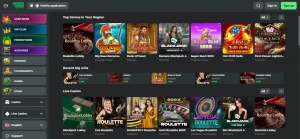
For the gambling product itself, SuperSpin games confirms that slots are part of the current casino catalogue, while SuperSpin live casino covers the dealer-led selection.
What Android users should expect
Android follows the same broad model: browser access plus add-to-home-screen guidance rather than a verified native casino package from Google Play. That distinction is particularly important because Google Play contains an unrelated game called “Super Spin” from Yso Corp. It is a spinning-top action game, not evidence of a SuperSpin casino app.
Users should therefore follow the casino’s own mobile instructions and verify the domain before saving a shortcut. The home-screen icon is a convenience for returning to the mobile site. It does not change the operator, licensing position or eligibility rules, and it should not be treated as an endorsement from an app marketplace.
No claim is made here about Android installation files, side-loaded APKs or permissions because those are not needed to explain the verified PWA route. Avoiding unverified downloads is also the cleaner way to keep the access method aligned with the brand’s browser-based guidance.
Games, live casino and cashier access on mobile
The verified SuperSpin product includes slots and live casino content. The official site also provides a mobile application entry point, reinforcing that mobile use is part of the product rather than an afterthought. Mobile availability does not guarantee that every game, payment route or feature will behave identically on every handset.
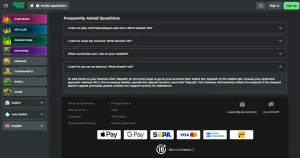
Game availability can change with provider, location and session context. Payment options can also be account specific. If your priority is the cashier rather than the interface, the page on SuperSpin payment methods explains why site-level payment logos should not be interpreted as a guarantee that every method is available to every account.
The practical benefit of the PWA model is that these sections can be reached from the same web-based account environment. The practical limitation is that there is no reason to assume native-only features such as store-managed updates, platform-specific widgets or biometric functions unless SuperSpin explicitly documents them.
How to add SuperSpin to a home screen safely
Start from the casino’s official website rather than from a search result for a similarly named app. On iOS, use the browser’s sharing or page actions to add the site to the home screen when that option is offered. On Android, use the browser’s install or add-to-home-screen function when available. The wording can differ by browser version, so the important part is the source: the shortcut should originate from the actual SuperSpin website.
Once saved, the icon is best thought of as a fast route back to the site. It does not create a separate gambling account, and your account state remains tied to the web service. If the brand changes its mobile instructions, follow the current official page rather than an old third-party tutorial.
Mobile access does not settle UK eligibility
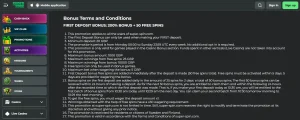
A working mobile page or PWA shortcut proves technical access, not permission to gamble for real money from a particular location. SuperSpin’s current bonus terms separately list the United Kingdom among restricted real-money countries. That is a different fact from whether the mobile interface loads on a phone.
Keeping these dimensions separate prevents a misleading conclusion. Technical mobile access can exist even where an account, promotion or real-money use is restricted. For the wider UK-facing context, use the SuperSpin Casino UK review rather than treating a successful home-screen installation as proof of account eligibility.
What a home-screen PWA can and cannot do
Because SuperSpin’s mobile access is built on a browser/PWA route rather than a native store package, it helps to be precise about what that model provides. A Progressive Web App runs through the phone’s existing browser engine, so the home-screen icon opens the same web experience rather than a separately installed program. In practice that means access does not depend on an App Store or Google Play listing, and there is no separate casino-app version to download and update; changes made to the website are what a returning user sees.
It also sets sensible expectations for how the two verified content areas behave. Slots and live casino are reached through the same web session, so a saved shortcut is a faster way back to that session rather than a different product. Features that people associate with native apps, such as store-managed updates, platform widgets, push notifications or biometric login, should not be assumed unless SuperSpin documents them, because a browser-based route does not guarantee any of them. Judging the mobile option on that basis keeps the decision aligned with what the PWA model actually delivers, instead of importing expectations from native apps that have not been verified for this casino.
When SuperSpin’s PWA makes sense on a UK phone
The PWA approach makes sense if you want a convenient home-screen route to the casino without relying on a native App Store or Google Play package. It is especially useful when the goal is simply faster repeat access to the same mobile website and account environment. The key is to distinguish that convenience from claims the evidence does not support: a PWA is not proof of a native casino app, and technical access is not proof of UK real-money eligibility. Use the official SuperSpin site for the shortcut, and treat similarly named store apps as unrelated unless the casino itself identifies them.